
Webhook Registration
Register Webhook to receive real-time transaction updates
- Log in to your account on the Zodia Markets Customer Portal
- Click on your profile icon in the top-right corner
- Select SETTINGS from the dropdown menu
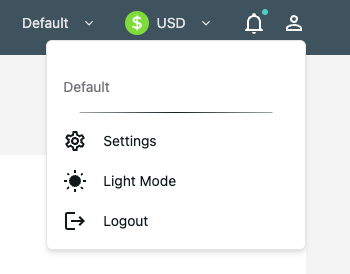
-
In the Settings page, click the Notifications tab
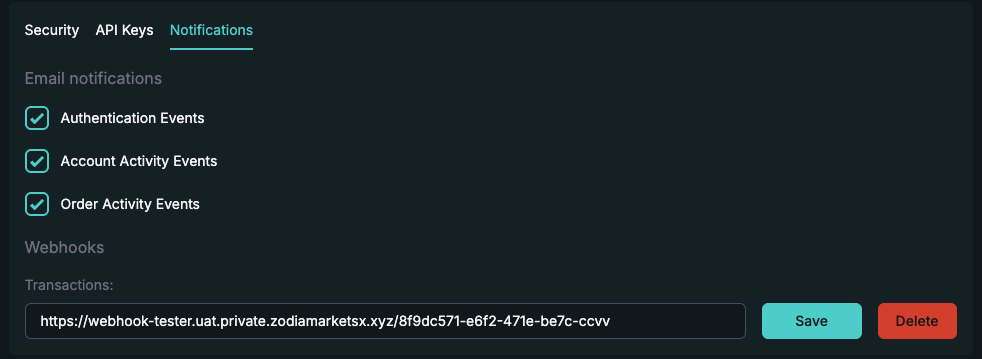
-
Add your webhook URL and click ‘Save’
Webhook URL Requirements:
- Must use HTTPS or HTTP protocol
- Must be publicly accessible
- Must return responses within 10 seconds
- Recommended: Use a dedicated endpoint (e.g.,
https://api.yourcompany.com/webhooks/zodia/transactions)
How Webhooks Work
Section titled “How Webhooks Work”Request Format
Section titled “Request Format”Zodia Markets sends webhook notifications as POST requests to your registered endpoint.
Request Method: POST
Request Headers:
Content-Type: application/jsonWebhook Payload
Section titled “Webhook Payload”Payload Structure
Section titled “Payload Structure”Request Body: The body contains transaction data in the same format as the Transaction List REST endpoint.
Sample:
{ "transactionClass": "RFSTRADE", "uuid": "0650ae88-f6cb-11f0-bee0-8bfc65fb40ae", "userUuid": "2073252c-81ed-41be-bf4d-d51b8f2246b8", "amount": 14799.1, "fee": 0, "balanceBefore": 0, "balanceAfter": 0, "ccy": "HKD", "transactionState": "PENDING", "transactionType": "TRADE_CREDIT", "received": 1769001230161, "processed": 1769001230161, "timestampMillis": 1769001230347, "displayTitle": null, "displayDescription": null, "paymentTransferType": null, "customRef": "407cbda6-0740-4ab4-8fc9-12ef40597048", "quoteId": "AnNxW46hcgwHCivIJ8wGJ48UJb2GRn35dUXJQgg7HMDa6aR8ZGtyTcbb3IMBABQqHD0ud16e1AseExAYAzg2E0xAbzg7cXVbDwB6G4w4/kJI2S8soeprQNeorLBRHmzZO4Ef0R0hEnpijiNOaRIF6xVxZ0heDCYrcYxjqRw7OiddOz4UCGIYGTkKbTFlEyvyrTLmtlt91Y3vXQrR5CeXGAAGABsRBzl0BgAPOgc+PhcJAmoMAzk6NVQFHzoZLRAIGhMAWRgGLgQDOAAMRS0+dzQrdDkSKAAqRz4UFEM7EBgCOD53EDhhRgstdRATA2EuET4QWUM7FDVSOwEQDwApMQ8GKjk=_client", "tradeId": "0650ae88-f6cb-11f0-bee0-8bfc65fb40ae", "executedPrice": "[USDC/HKD] 7.78899821", "tradeRef": "24e7091a9e114f83837e58e1256eb349_client", "settleDate": "2026-01-22", "beneficiaryUuid": null}State Change Notifications
Section titled “State Change Notifications”Your webhook receives notifications when transactionState changes. PENDING is the initial value; PROCESSED, REVERSED and CANCELLED are the terminal values a later notification can carry — the same four states documented in the Transaction List endpoint’s transactionState table. REVERSED (a leg of the transaction has been reversed) and CANCELLED (settlement has been cancelled) both mean the transfer did not complete.
State Flow:
PENDING → PROCESSEDPENDING → REVERSEDPENDING → CANCELLEDExample State Change:
Initial notification (PENDING):
{ "uuid": "0650ae88-f6cb-11f0-bee0-8bfc65fb40ae", "transactionState": "PENDING", "transactionClass": "RFSTRADE", ...}Update notification (PROCESSED):
{ "uuid": "0650ae88-f6cb-11f0-bee0-8bfc65fb40ae", "transactionState": "PROCESSED", "transactionClass": "RFSTRADE", ...}Update notification (REVERSED):
{ "uuid": "0650ae88-f6cb-11f0-bee0-8bfc65fb40ae", "transactionState": "REVERSED", "transactionClass": "RFSTRADE", ...}Transaction Types
Section titled “Transaction Types”Your webhook receives updates for all transaction types:
| Transaction Class | Description | Updates |
|---|---|---|
| OTCTRADE | Trade legs entered by the Zodia Markets OTC desk. Each leg generates a separate notification (e.g., USDC buy leg and HKD sell leg) | When trade leg transactionState changes |
| RFSTRADE | Trade legs entered via e-Trader platform or WebSocket API. Each leg generates a separate notification (e.g., USDC buy leg and HKD sell leg) | When trade leg transactionState changes |
| COIN | Crypto deposit and withdrawal transactions | When transaction transactionState changes |
| CASH | Fiat deposit and withdrawal transactions | When transaction transactionState changes |
Transaction Types Detail
Section titled “Transaction Types Detail”| Transaction Type | Description |
|---|---|
TRADE_CREDIT |
Credit side of a trade (receiving asset) |
TRADE_DEBIT |
Debit side of a trade (sending asset) |
DEPOSIT |
Incoming deposit (crypto or fiat) |
WITHDRAWAL |
Outgoing withdrawal (crypto or fiat) |
IP Whitelisting
Section titled “IP Whitelisting”All webhook notifications are sent from a fixed set of static IP addresses. You can whitelist these IPs on your firewall or WAF to ensure you only accept traffic from Zodia Markets.
Current IPs
Section titled “Current IPs”18.175.43.21635.177.190.134
Programmatic IP Discovery
Section titled “Programmatic IP Discovery”Rather than hardcoding IPs, we recommend fetching them programmatically from our published endpoint:
GET https://trade.zodiamarkets.com/.well-known/webhooks/ips.jsonResponse:
{ "service": "zodia-markets-ips", "version": 1, "ipv4_cidrs": [ "18.175.43.216/32", "35.177.190.134/32" ], "created_at": "2026-03-10T00:00:00Z", "last_updated": "2026-03-10T00:00:00Z", "change_notice": null}Fields:
| Field | Description |
|---|---|
version |
Integer that increments whenever the IP list changes. Monitor this to detect updates. |
ipv4_cidrs |
List of source IP addresses in CIDR notation (/32 = single IP). |
last_updated |
Timestamp of the most recent change to the IP list. |
change_notice |
null when no changes are planned. When an IP change is scheduled, this will contain a message and effective_date. |
IP Change Policy: Zodia Markets will provide a minimum of 30 days’ advance notice before any change to the webhook source IPs. During transitions, both old and new IPs will be active simultaneously. The
change_noticefield and notifications will communicate upcoming changes.
Expected Response
Section titled “Expected Response”Success Response
Section titled “Success Response”Your webhook endpoint must return a successful HTTP status code to acknowledge receipt.
Success Status Codes:
200 OK(recommended)201 Created202 Accepted204 No Content
Response Body: Optional (can be empty)
Example Success Response:
HTTP/1.1 200 OKContent-Type: application/json
{  "received": true,  "transactionId": "0650ae88-f6cb-11f0-bee0-8bfc65fb40ae"}
Error Handling
Section titled “Error Handling”If your webhook endpoint returns an error or times out, Zodia Markets will retry the notification.
Error Status Codes:
4xx(Client Error) - No retry5xx(Server Error) - Will retry with exponential backoff- Timeout (>10 seconds) - Will retry max 3 times if webhook service endpoint is available
Recommendations
Section titled “Recommendations”Idempotency: Your webhook may receive the same notification multiple times. Implement idempotent processing using the uuid field.
# Track processed transaction UUIDsprocessed_transactions = set()
def process_webhook(transaction):    transaction_uuid = transaction['uuid']
    if transaction_uuid in processed_transactions:        print(f"Duplicate notification for {transaction_uuid}, skipping")        return
    # Process transaction    handle_transaction(transaction)
    # Mark as processed    processed_transactions.add(transaction_uuid)
Filter by Transaction State
Section titled “Filter by Transaction State”transactionState is PENDING while the transaction is in flight. PROCESSED, REVERSED and CANCELLED are the terminal values — do not treat “not PROCESSED” as “still pending” and skip it: REVERSED and CANCELLED both mean the transfer did not complete, and need handling of their own.
def process_webhook(transaction):    state = transaction['transactionState']
    if state == 'PENDING':        print(f"Transaction {transaction['uuid']} still pending, skipping")        return
    if state == 'PROCESSED':        handle_processed_transaction(transaction)    elif state in ('REVERSED', 'CANCELLED'):        # The transfer did not complete: handle it, do not discard it.        handle_incomplete_transaction(transaction)    else:        print(f"Unrecognised transactionState: {state}")
Handle Third-Party Settlement
Section titled “Handle Third-Party Settlement”Check for beneficiary UUID to identify third-party settlements:
def process_webhook(transaction): if transaction.get('beneficiaryUuid'): print(f"Third-party settlement detected") print(f"Beneficiary: {transaction['beneficiaryUuid']}") handle_third_party_settlement(transaction) else: print(f"Standard settlement to own account") handle_standard_settlement(transaction)Log Everything
Section titled “Log Everything”import logging
@app.route('/webhook', methods=['POST'])def webhook(): transaction = request.json
# Log incoming webhook logging.info(f"Webhook received: {transaction['uuid']}") logging.info(f"Class: {transaction['transactionClass']}") logging.info(f"State: {transaction['transactionState']}") logging.info(f"Amount: {transaction['amount']} {transaction['ccy']}")
try: process_webhook(transaction) logging.info(f"Webhook processed successfully: {transaction['uuid']}") except Exception as e: logging.error(f"Webhook processing failed: {e}") raise
return jsonify({'received': True}), 200